6.3 KiB
Video-Summary


A Python-based video summarization tool that extracts contours from video frames to create condensed summaries. Perfect for analyzing surveillance footage, time-lapse videos, or any static camera recording where you want to extract and visualize movement over time.
✨ Features
- Movement Detection: Automatically detects and extracts moving objects from static camera footage
- Layer-Based Processing: Groups related movements across frames into coherent layers
- Heatmap Generation: Visualizes areas of activity in the video
- Configurable: Extensive configuration options for fine-tuning detection sensitivity
- Efficient: Processes video faster than real-time on modern hardware
- Caching: Saves intermediate results for faster re-processing with different parameters
🚀 Quick Start
Installation
# Clone the repository
git clone https://github.com/Askill/Video-Summary.git
cd Video-Summary

# Create virtual environment
python -m venv venv
source venv/bin/activate  # On Windows: venv\Scripts\activate

# Install dependencies
pip install -r requirements.txt

# Install system dependencies (Linux)
sudo apt-get install ffmpeg libsm6 libxext6 libxrender-dev
Basic Usage
# Process a video with default settings
python main.py input_video.mp4 output_dir

# Use custom configuration
python main.py input_video.mp4 output_dir config.json

# Enable verbose logging
python main.py input_video.mp4 output_dir --verbose
📊 Example Output
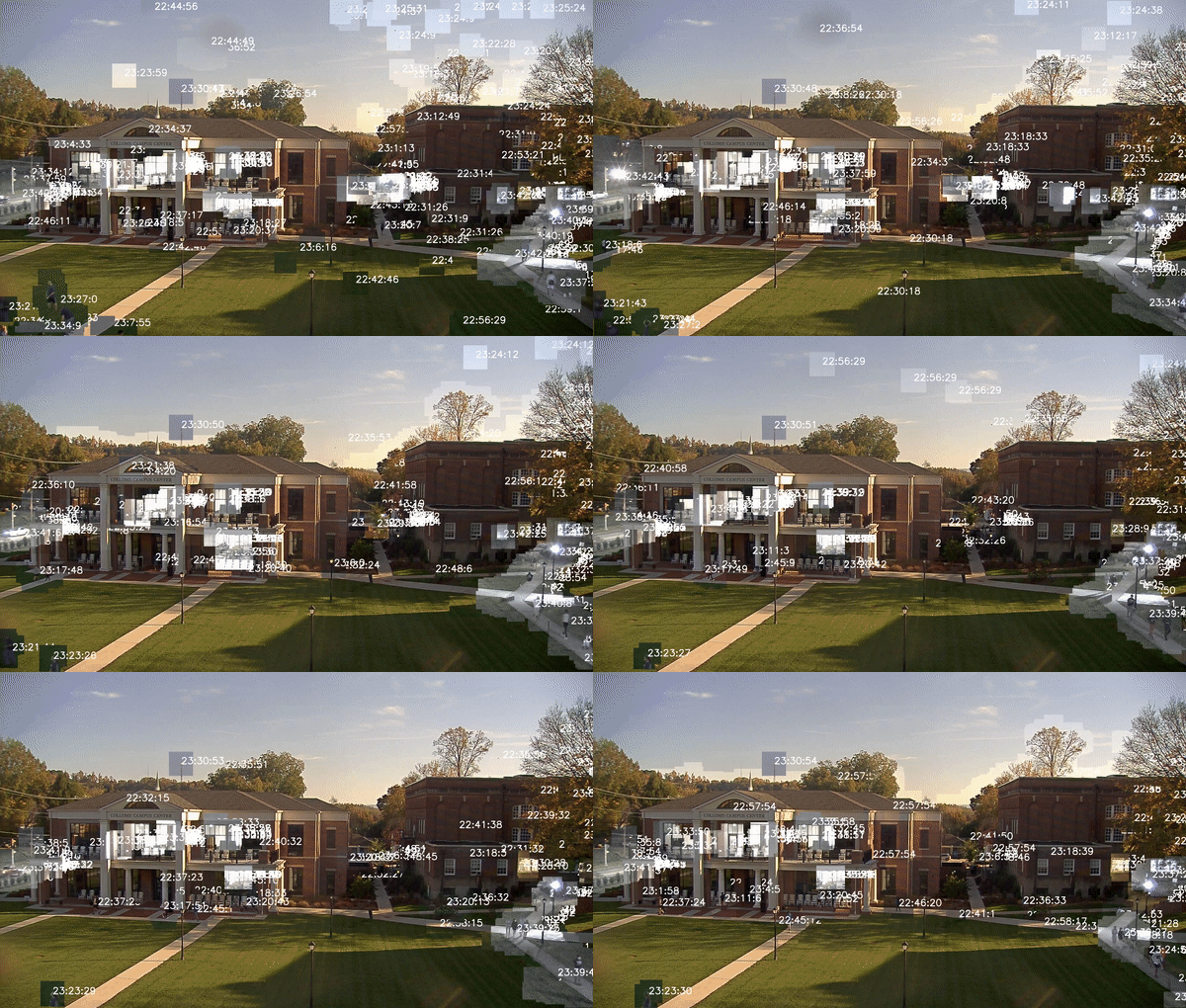
A 15-second excerpt of a 2-minute overlaid synopsis of a 2.5-hour video from a campus webcam.
Heatmap Visualization
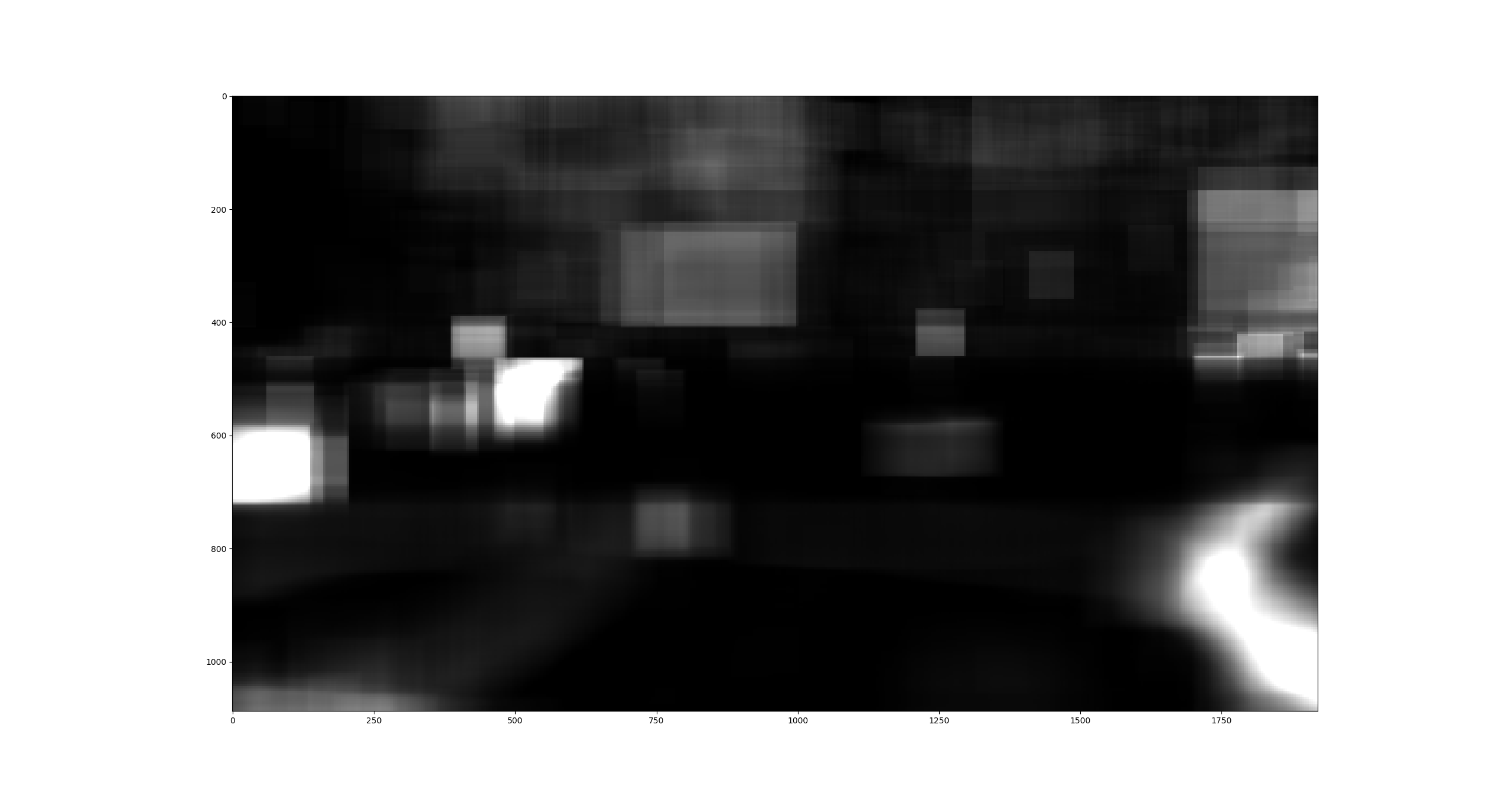
The heatmap shows areas of activity throughout the video, with brighter regions indicating more movement.
⚙️ Configuration
Create a JSON configuration file to customize processing parameters:
{
  "min_area": 300,
  "max_area": 900000,
  "threshold": 7,
  "resizeWidth": 700,
  "maxLayerLength": 5000,
  "minLayerLength": 40,
  "tolerance": 20,
  "ttolerance": 50,
  "videoBufferLength": 250,
  "LayersPerContour": 220,
  "avgNum": 10
}
Configuration Parameters
| Parameter | Description | Default |
|---|---|---|
min_area |
Minimum contour area in pixels (smaller ignored) | 300 |
max_area |
Maximum contour area in pixels (larger ignored) | 900000 |
threshold |
Luminance difference threshold for movement detection | 7 |
resizeWidth |
Video is scaled to this width internally for processing | 700 |
maxLayerLength |
Maximum length of a layer in frames | 5000 |
minLayerLength |
Minimum length of a layer in frames | 40 |
tolerance |
Max distance (pixels) between contours to aggregate into layer | 20 |
ttolerance |
Number of frames movement can be apart before creating new layer | 50 |
videoBufferLength |
Buffer length of Video Reader component | 250 |
LayersPerContour |
Number of layers a single contour can belong to | 220 |
avgNum |
Number of images to average before calculating difference | 10 |
Note:
avgNumis computationally expensive but needed in outdoor scenarios with clouds, leaves moving in wind, etc.
📈 Performance Benchmarks
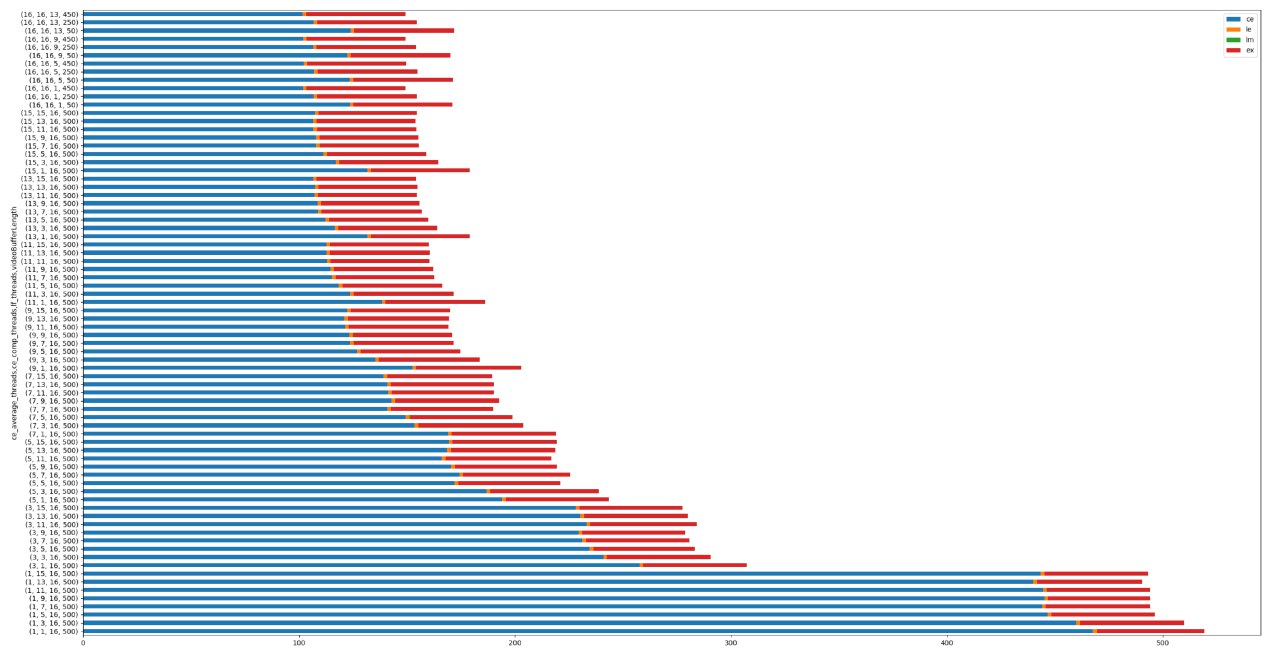
Test Configuration:
- Hardware: Ryzen 3700X (8 cores, 16 threads), 32GB RAM
- Video: 10-minute clip
- Processing Speed: ~20 seconds per minute of video (1:3 ratio)
- Memory Usage: Max 6GB RAM
Component Breakdown:
- CE = Contour Extractor
- LF = Layer Factory
- LM = Layer Manager
- EX = Exporter
🏗️ Architecture
Video-Summary/
├── Application/              # Core processing modules
│   ├── Config.py            # Configuration management
│   ├── ContourExctractor.py # Movement detection
│   ├── LayerFactory.py      # Layer extraction
│   ├── LayerManager.py      # Layer optimization
│   ├── Exporter.py          # Output generation
│   ├── VideoReader.py       # Video I/O
│   ├── HeatMap.py           # Heatmap generation
│   ├── Importer.py          # Cache loading
│   ├── Layer.py             # Layer data structure
│   └── Logger.py            # Logging utilities
├── main.py                  # CLI entry point
├── pyproject.toml           # Package configuration
└── requirements.txt         # Dependencies
Processing Pipeline
- Video Reading: Load and preprocess video frames
- Contour Extraction: Detect movement by comparing consecutive frames
- Layer Creation: Group related contours across frames
- Layer Management: Filter and optimize layers based on configuration
- Export: Generate output video with overlaid movement and heatmap
🧪 Development
Code Quality Tools
We use modern Python development tools:
- Black: Code formatting
- isort: Import sorting
- flake8: Linting
- mypy: Type checking
- pre-commit: Automated checks
# Install development dependencies
pip install -e ".[dev]"

# Install pre-commit hooks
pre-commit install

# Run formatting
black .
isort .

# Run linting
flake8 .
mypy Application/ main.py
Running Tests
# Run all tests
pytest

# Run with coverage
pytest --cov=Application --cov-report=html
📝 Contributing
We welcome contributions! Please see CONTRIBUTING.md for guidelines.
📄 License
This project is licensed under the MIT License - see the LICENSE file for details.
The original Creative Commons licensed documentation can be found in licens.txt.
🙏 Acknowledgments
- Built with OpenCV, NumPy, and imageio
- Inspired by video synopsis research in computer vision
📮 Contact
For questions or issues, please open an issue on GitHub.
Note: TensorFlow support is optional and not required for core functionality. The project works perfectly fine without GPU acceleration, though processing times will be longer for large videos.